
Clean safely.Spot disk trouble early.Save your files.సురక్షితంగా క్లీన్ చేయండి.డిస్క్ సమస్యని ముందే పట్టుకోండి.మీ ఫైళ్లు కాపాడుకోండి.
SectorIQ is a Windows app in Telugu and English with 35 tools for cleaning, speed, disk health, drivers, repairs and data rescue. Every item is marked Safe, Review or Never — so nothing important is deleted by mistake.
SectorIQ తెలుగు, ఇంగ్లీష్లో పని చేసే Windows యాప్ — క్లీనింగ్, వేగం, డిస్క్ ఆరోగ్యం, డ్రైవర్లు, రిపేర్లు, డేటా రెస్క్యూ కోసం 35 టూల్స్. ప్రతి అంశానికి సురక్షితం, చూసి చేయండి, ఎప్పుడూ కాదు అనే గుర్తు ఉంటుంది — ముఖ్యమైనది పొరపాటున డిలీట్ కాదు.
- Windows 7, 8, 10, 11Windows 7, 8, 10, 11
- Telugu + Englishతెలుగు + ఇంగ్లీష్
- Works offlineఆఫ్లైన్లో పని చేస్తుంది
- 7-day free Pro trial7 రోజుల ఉచిత ప్రో ట్రయల్
See it workingపని చేసే విధానం చూడండి
Real screens from the app. Pick one to see what it shows.
యాప్ నుండి అసలు స్క్రీన్లు. ఒకటి ఎంచుకుని అది ఏమి చూపిస్తుందో చూడండి.
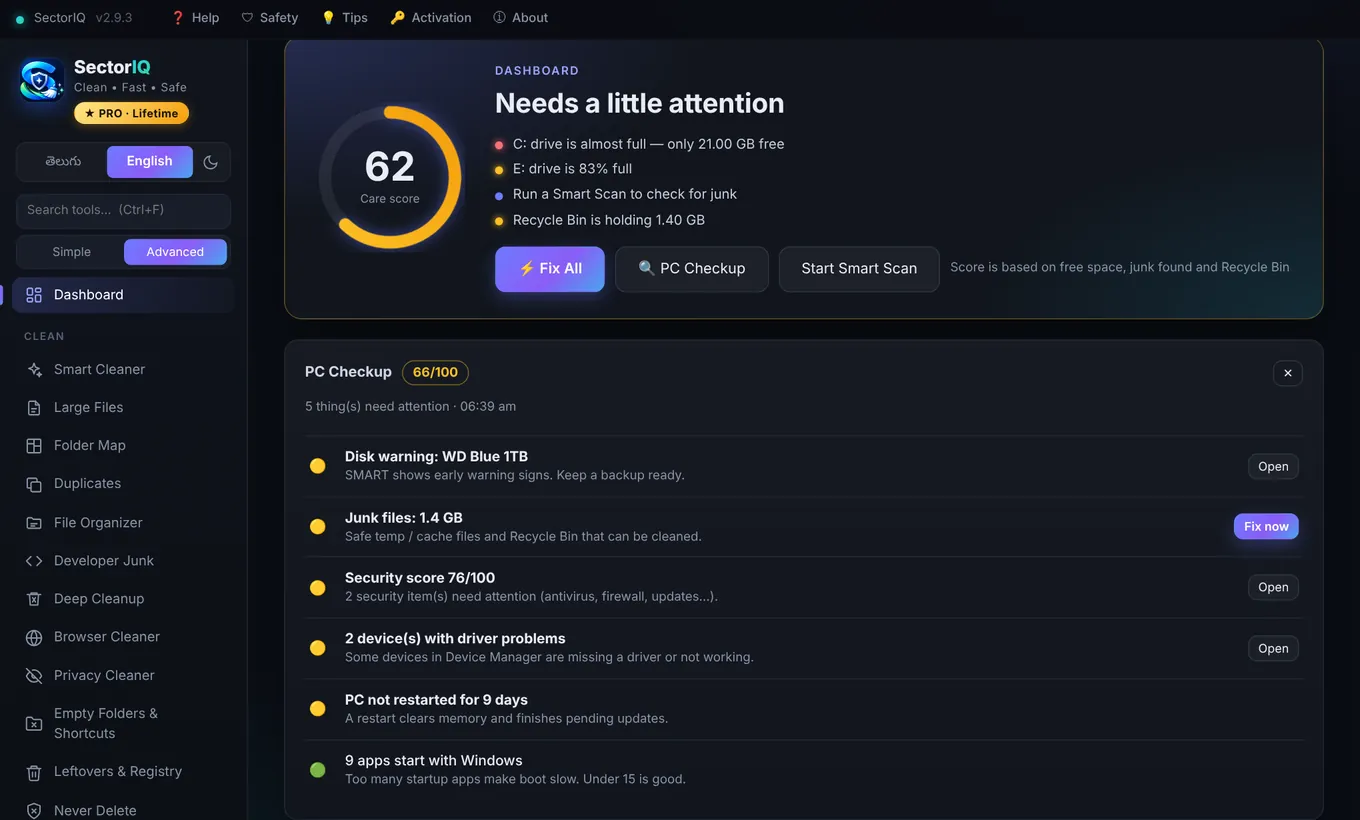
35 tools, grouped like the app35 టూల్స్ — యాప్లో ఉన్నట్టే
Simple mode shows only the main ones, so normal users are not confused. Advanced mode and the search box show everything.
సింపుల్ మోడ్ ముఖ్యమైనవి మాత్రమే చూపిస్తుంది — సాధారణ యూజర్లు గందరగోళపడరు. అడ్వాన్స్డ్ మోడ్, సెర్చ్ బాక్స్ అన్నీ చూపిస్తాయి.
Cleanక్లీన్
- Smart Cleanerస్మార్ట్ క్లీనర్Windows temp, update cache, app caches (WhatsApp, Telegram, Teams, Adobe…) — each item says what it is.Windows temp, update cache, యాప్ cache లు (WhatsApp, Telegram, Teams, Adobe…) — ప్రతిదీ అది ఏమిటో చెప్తుంది.
- Large Filesపెద్ద ఫైళ్లుFind files over 100 MB, 1 GB or 5 GB on any drive.ఏ డ్రైవ్లో అయినా 100 MB, 1 GB, 5 GB కంటే పెద్ద ఫైళ్లు.
- Folder Mapఫోల్డర్ మ్యాప్PROEvery folder as a box — the biggest box is what fills your drive.ప్రతి ఫోల్డర్ ఒక బాక్స్ — పెద్ద బాక్స్ డ్రైవ్ని నింపుతున్నది.
- Duplicatesనకిలీ ఫైళ్లుPROSame photo or video saved many times, found by content — keeps one copy.ఒకే ఫోటో / వీడియో చాలాసార్లు — కంటెంట్ పోల్చి కనుగొంటుంది, ఒక కాపీ ఉంచుతుంది.
- File Organizerఫైల్ ఆర్గనైజర్Part Proకొంత ప్రోSort Downloads by type, find unused files, sync a folder to a backup disk — with Undo.Downloads ని రకం వారీగా సర్దుతుంది, వాడని ఫైళ్లు, బ్యాకప్ డిస్క్కి సింక్ — Undo తో.
- Developer Junkడెవలపర్ జంక్node_modules, Flutter / Android build folders from old projects.పాత ప్రాజెక్టుల node_modules, Flutter / Android build ఫోల్డర్లు.
- Deep Cleanupడీప్ క్లీనప్WinSxS, Windows.old, hibernation file and old driver copies.WinSxS, Windows.old, hibernation ఫైల్, పాత డ్రైవర్ కాపీలు.
- Browser Cleanerబ్రౌజర్ క్లీనర్Cache, history and cookies of Chrome, Edge, Brave, Opera, Firefox — passwords are never touched.Chrome, Edge, Brave, Opera, Firefox cache, history, cookies — పాస్వర్డ్లు ముట్టుకోము.
- Privacy Cleanerప్రైవసీ క్లీనర్Recent files, jump lists, Run history and clipboard.Recent files, jump lists, Run history, clipboard.
- Empty Folders & Shortcutsఖాళీ ఫోల్డర్లు & షార్ట్కట్లుEmpty folders, broken shortcuts and 0-byte files.ఖాళీ ఫోల్డర్లు, పనికిరాని షార్ట్కట్లు, 0-byte ఫైళ్లు.
- Leftovers & Registryమిగిలిన ఫైళ్లు & రిజిస్ట్రీPROData left by removed software — every registry key backed up first.తీసేసిన సాఫ్ట్వేర్ వదిలిన డేటా — ప్రతి రిజిస్ట్రీ కీ ముందే బ్యాకప్.
Speedవేగం
- PC CheckupPC చెకప్One click: junk, disk space, disk health, security, startup, drivers, crashes — with a score.ఒక్క క్లిక్: జంక్, డిస్క్ స్థలం, డిస్క్ ఆరోగ్యం, సెక్యూరిటీ, స్టార్టప్, డ్రైవర్లు, క్రాష్లు — స్కోర్తో.
- Startup Managerస్టార్టప్ మేనేజర్Apps that start with Windows, with their real boot impact.Windows తో స్టార్ట్ అయ్యే యాప్లు, అసలు బూట్ ప్రభావంతో.
- Process Monitorప్రాసెస్ మానిటర్Live RAM and CPU per app — freeze or close the heavy one.ప్రతి యాప్ RAM, CPU లైవ్ గా — బరువైనది ఆపండి.
- Installed Appsఇన్స్టాల్ చేసిన యాప్లుSorted by size, with deep uninstall and leftover scan.సైజు ప్రకారం, పూర్తి అన్ఇన్స్టాల్ + మిగిలినవాటి స్కాన్.
- Software Updaterసాఫ్ట్వేర్ అప్డేటర్PROUpdate old apps with Microsoft's official winget installers.పాత యాప్లను Microsoft అధికారిక winget తో అప్డేట్.
- Services Optimizerసర్వీసెస్ ఆప్టిమైజర్PROTurn off background services you don't use — safe list only, undo anytime.వాడని background సర్వీసులు ఆఫ్ — సురక్షితమైనవి మాత్రమే, ఎప్పుడైనా ON.
- Right-click Menuరైట్-క్లిక్ మెనూPRORemove clutter that apps added to the right-click menu.యాప్లు రైట్-క్లిక్ మెనూకి కలిపిన అదనపువి తీసేయండి.
- Networkనెట్వర్క్Speed test, DNS speed test and changer, Wi-Fi passwords, Wi-Fi channel analyzer.స్పీడ్ టెస్ట్, DNS స్పీడ్ టెస్ట్ & మార్పు, Wi-Fi పాస్వర్డ్లు, Wi-Fi ఛానల్.
Toolsటూల్స్
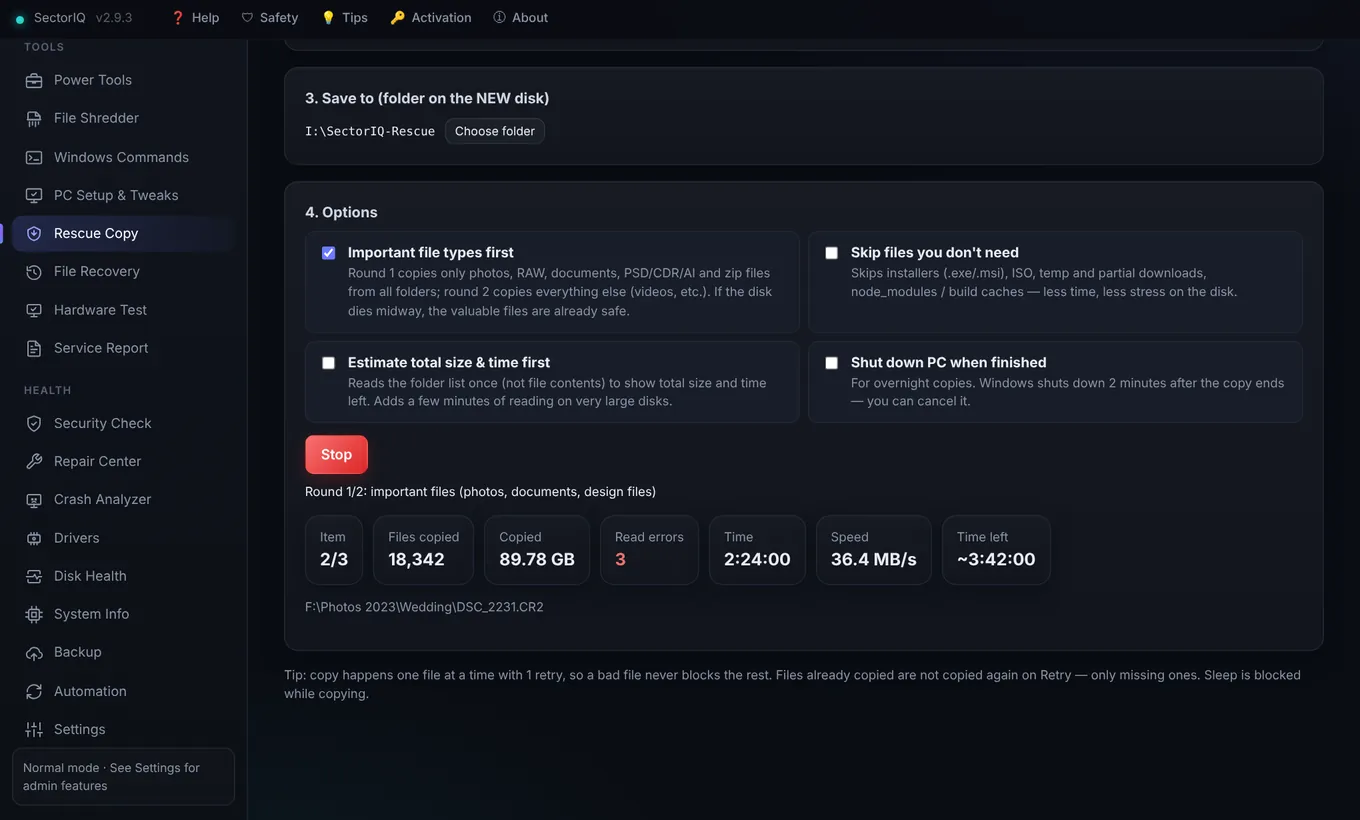
- Rescue Copyరెస్క్యూ కాపీPROCopy files off a failing disk — bad files are skipped, important types first.పాడవుతున్న డిస్క్ నుండి ఫైళ్లు కాపీ — చెడ్డవి skip, ముఖ్యమైనవి ముందు.
- File Recoveryఫైల్ రికవరీPROBring back deleted photos and documents with Microsoft's own recovery tool.డిలీట్ అయిన ఫోటోలు, డాక్యుమెంట్లు Microsoft సొంత టూల్తో తిరిగి.
- Hardware Testహార్డ్వేర్ టెస్ట్Screen pixels, keyboard, speakers, mic, webcam, mouse, CPU stress, RAM test.స్క్రీన్ పిక్సెల్స్, కీబోర్డ్, స్పీకర్లు, మైక్, వెబ్క్యామ్, మౌస్, CPU స్ట్రెస్, RAM.
- Power Toolsపవర్ టూల్స్PROUSB shortcut-virus fix, bloatware remover, locked-file finder, batch rename.USB shortcut virus fix, bloatware, లాక్ ఫైల్ ఫైండర్, batch rename.
- File Shredderఫైల్ ష్రెడర్PRODelete private files so recovery software cannot bring them back.ప్రైవేట్ ఫైళ్లు — రికవరీ సాఫ్ట్వేర్ కూడా తిరిగి తేలేనట్టు.
- Windows CommandsWindows కమాండ్స్Useful commands with meaning and Windows 7–11 support, run in one click.ఉపయోగకరమైన కమాండ్స్ — అర్థం, Windows 7–11 సపోర్ట్, ఒక్క క్లిక్.
- PC Setup & TweaksPC సెటప్ & ట్వీక్స్PRONew PC: install Chrome, VLC, AnyDesk… in one go, then useful settings.కొత్త PC: Chrome, VLC, AnyDesk… ఒకేసారి, తర్వాత ఉపయోగకరమైన సెట్టింగ్లు.
- Service Reportసర్వీస్ రిపోర్ట్PROA4 PDF for your customer with your shop name and logo.మీ షాప్ పేరు, లోగోతో కస్టమర్కి A4 PDF.
Healthఆరోగ్యం
- Disk Healthడిస్క్ ఆరోగ్యంSMART read with the smartmontools drive database — warns before a disk fails.smartmontools డ్రైవ్ డేటాబేస్తో SMART — డిస్క్ పోయే ముందే హెచ్చరిక.
- Crash Analyzerక్రాష్ అనలైజర్Why the PC showed a blue screen or turned off — in plain words.బ్లూ స్క్రీన్ / సడెన్ ఆఫ్ ఎందుకు — సులభమైన మాటల్లో.
- Driversడ్రైవర్లుPart Proకొంత ప్రోDevices with missing drivers, plus official updates from Windows Update.డ్రైవర్ లేని డివైస్లు, Windows Update నుండి అధికారిక అప్డేట్లు.
- Security Checkసెక్యూరిటీ చెక్Antivirus, firewall, updates, UAC on one screen — plus Defender offline scan.యాంటీవైరస్, ఫైర్వాల్, updates, UAC ఒకే చోట — Defender ఆఫ్లైన్ స్కాన్ కూడా.
- Repair Centerరిపేర్ సెంటర్SFC + DISM, internet, Windows Update, printer, sound and more — one click each.SFC + DISM, ఇంటర్నెట్, Windows Update, ప్రింటర్, సౌండ్… ఒక్కో క్లిక్.
- System Infoసిస్టమ్ సమాచారంFull PC details, Windows license and product key, battery health.పూర్తి PC వివరాలు, Windows లైసెన్స్ & కీ, బ్యాటరీ ఆరోగ్యం.
- Backupబ్యాకప్PROCopy important folders to another drive and verify every file.ముఖ్యమైన ఫోల్డర్లు వేరే డ్రైవ్కి, ప్రతి ఫైల్ వెరిఫై.
- Automationఆటోమేషన్PROWeekly safe auto-clean, low-space clean, USB auto-scan, weekly report.వారపు సురక్షిత ఆటో-క్లీన్, తక్కువ స్థలం క్లీన్, USB ఆటో-స్కాన్, రిపోర్ట్.
When a disk starts failingడిస్క్ పాడవడం మొదలైనప్పుడు
Photos, client work and accounts live on one disk. SectorIQ helps you notice early and get the files off in the right order.
ఫోటోలు, క్లయింట్ వర్క్, అకౌంట్లు ఒకే డిస్క్లో ఉంటాయి. SectorIQ ముందే గుర్తించి, సరైన క్రమంలో ఫైళ్లు బయటకు తీయడానికి సహాయం చేస్తుంది.
Disk Health warns youడిస్క్ ఆరోగ్యం హెచ్చరిస్తుంది
Reallocated and pending sectors are read with the smartmontools drive database, so SSD and HDD values are decoded for the exact model.
Reallocated, pending sectors ని smartmontools డ్రైవ్ డేటాబేస్తో చదువుతుంది — SSD, HDD విలువలు ఆ మోడల్కి తగినట్టు.
Rescue Copy, important files firstరెస్క్యూ కాపీ — ముఖ్యమైనవి ముందు
Photos, RAW, documents and design files are copied in round one. Unreadable files are skipped, never stuck.
ఫోటోలు, RAW, డాక్యుమెంట్లు, డిజైన్ ఫైళ్లు మొదటి రౌండ్లో. చదవలేనివి skip — ఎప్పుడూ ఇరుక్కుపోదు.
Check the copied filesకాపీ అయిన ఫైళ్లు చెక్
Finds photos, PDFs and ZIPs that were already damaged on the old disk.
పాత డిస్క్లోనే పాడైన ఫోటోలు, PDF లు, ZIP లు కనుగొంటుంది.
Give the customer a reportకస్టమర్కి రిపోర్ట్
A recovery report PDF lists what came back and what could not.
ఏమి వచ్చాయి, ఏవి రాలేదో రికవరీ రిపోర్ట్ PDF లో.
Honest by designనిజాయితీగా తయారు చేశాం
Many PC cleaners add tools that look busy but do nothing — or break Windows. SectorIQ leaves them out.
చాలా PC క్లీనర్లు పని చేస్తున్నట్టు కనిపించే, కానీ ఏమీ చేయని — లేదా Windows ని పాడుచేసే టూల్స్ పెడతాయి. SectorIQ వాటిని పెట్టలేదు.
What SectorIQ will not doSectorIQ చేయనివి
- No "RAM booster""RAM booster" లేదుWindows manages memory better on its own.Windows మెమరీని తానే బాగా చూసుకుంటుంది.
- No registry cleaner for "speed""వేగం" కోసం registry cleaner లేదుIt does not speed anything up and can break apps.దాంతో వేగం పెరగదు, యాప్లు పాడవచ్చు.
- No third-party driver downloadsథర్డ్-పార్టీ డ్రైవర్ డౌన్లోడ్లు లేవుDriver updates come only from Windows Update.డ్రైవర్ అప్డేట్లు Windows Update నుండి మాత్రమే.
- No scary fake numbersభయపెట్టే నకిలీ సంఖ్యలు లేవుPrefetch is not called junk. Safe is safe.Prefetch ని జంక్ అనము. సురక్షితం అంటే సురక్షితమే.
How it keeps your files safeమీ ఫైళ్లను ఎలా కాపాడుతుంది
- Recycle Bin by defaultడిఫాల్ట్ గా రీసైకిల్ బిన్Deleted something by mistake? Restore it.పొరపాటున డిలీట్ చేశారా? తిరిగి తెచ్చుకోండి.
- Preview and UndoPreview & UndoNothing moves without a preview; every move can be undone.Preview లేకుండా ఏదీ మారదు; ప్రతి మార్పు Undo చేయవచ్చు.
- Protected listరక్షిత లిస్ట్pagefile, Windows folders, logins and WSL disks are blocked everywhere.pagefile, Windows ఫోల్డర్లు, లాగిన్లు, WSL డిస్క్లు ఎక్కడా డిలీట్ కావు.
- Repairs you can watchకనిపించే రిపేర్లుEvery Windows fix runs in its own window, step by step.ప్రతి Windows fix వేరే విండోలో, స్టెప్ బై స్టెప్.
Made for computer shops tooకంప్యూటర్ షాపుల కోసం కూడా
Start every service job with a PC Checkup and finish with a branded PDF your customer can keep.
ప్రతి సర్వీస్ పని PC చెకప్ తో మొదలుపెట్టి, కస్టమర్ ఉంచుకునే మీ బ్రాండ్ PDF తో ముగించండి.
Service Report PDFసర్వీస్ రిపోర్ట్ PDF
PC details, Windows license, disk health, security and work done — with your shop name and logo.
PC వివరాలు, Windows లైసెన్స్, డిస్క్ ఆరోగ్యం, సెక్యూరిటీ, చేసిన పని — మీ షాప్ పేరు, లోగోతో.
Recovery Report PDFరికవరీ రిపోర్ట్ PDF
How many files and GB you recovered, and which ones were unreadable.
ఎన్ని ఫైళ్లు, ఎంత GB రికవర్ చేశారు, ఏవి చదవలేకపోయాం.
Used PC checkపాత PC చెక్
Screen, keyboard, battery, disk health and CPU stress before you buy or sell.
కొనే / అమ్మే ముందు స్క్రీన్, కీబోర్డ్, బ్యాటరీ, డిస్క్ ఆరోగ్యం, CPU స్ట్రెస్.
New PC setupకొత్త PC సెటప్
Install the usual apps in one go and apply sensible settings.
సాధారణ యాప్లు ఒకేసారి ఇన్స్టాల్ చేసి, మంచి సెట్టింగ్లు.
USB shortcut virusUSB shortcut virus
Customers' pen drives fixed in a minute — hidden files come back.
కస్టమర్ పెన్ డ్రైవ్లు నిమిషంలో — దాచిన ఫైళ్లు తిరిగి కనిపిస్తాయి.
Remote helpరిమోట్ హెల్ప్
AnyDesk and WhatsApp from inside the app for quick support.
త్వరిత సపోర్ట్ కోసం యాప్ లోపలి నుండే AnyDesk, WhatsApp.
Free to start. Pro when you need more.ఉచితంగా మొదలుపెట్టండి. అవసరమైతే ప్రో.
Every install gets all Pro tools free for 7 days. After that the free tools keep working.
ప్రతి ఇన్స్టాల్కి 7 రోజులు అన్ని ప్రో టూల్స్ ఉచితం. తర్వాత ఉచిత టూల్స్ పని చేస్తూనే ఉంటాయి.
Freeఉచితం
- Smart Cleaner, Fix All and PC Checkupస్మార్ట్ క్లీనర్, Fix All, PC చెకప్
- Disk Health with drive databaseడ్రైవ్ డేటాబేస్తో డిస్క్ ఆరోగ్యం
- Startup, Processes, Installed Appsస్టార్టప్, ప్రాసెసెస్, ఇన్స్టాల్ చేసిన యాప్లు
- Security Check and Repair Centerసెక్యూరిటీ చెక్, రిపేర్ సెంటర్
- Crash Analyzer, driver problem scanక్రాష్ అనలైజర్, డ్రైవర్ సమస్యల స్కాన్
- Hardware Test, Network, System Infoహార్డ్వేర్ టెస్ట్, నెట్వర్క్, సిస్టమ్ సమాచారం
- Previews in File Organizerఫైల్ ఆర్గనైజర్లో previews
Pro — lifetimeప్రో — లైఫ్టైమ్
- Everything in Freeఉచితంలో ఉన్నవన్నీ
- Rescue Copy, File Recovery, Backupరెస్క్యూ కాపీ, ఫైల్ రికవరీ, బ్యాకప్
- Folder Map, Duplicates, File Organizer actionsఫోల్డర్ మ్యాప్, నకిలీ ఫైళ్లు, ఫైల్ ఆర్గనైజర్ పనులు
- Software and driver updatesసాఫ్ట్వేర్, డ్రైవర్ అప్డేట్లు
- Leftovers, Services, Right-click menu, Power Toolsమిగిలిన ఫైళ్లు, సర్వీసెస్, రైట్-క్లిక్ మెనూ, పవర్ టూల్స్
- PC Setup, File Shredder, AutomationPC సెటప్, ఫైల్ ష్రెడర్, ఆటోమేషన్
- Service Report and Recovery Report PDFs with your shop logoమీ షాప్ లోగోతో సర్వీస్ రిపోర్ట్, రికవరీ రిపోర్ట్ PDF లు
Download SectorIQSectorIQ డౌన్లోడ్
Free download. Installs in under a minute and updates itself.
ఉచిత డౌన్లోడ్. నిమిషంలోపు ఇన్స్టాల్ అవుతుంది, తానే అప్డేట్ అవుతుంది.
Windows 10 / 11
Versionవెర్షన్ 2.9 · 64-bit
Download for Windows 10 / 11Windows 10 / 11 కోసం డౌన్లోడ్- 4 GB RAM or more, 300 MB free space4 GB RAM పైన, 300 MB ఖాళీ స్థలం
- Recommended for most PCsచాలా PC లకు ఇదే
Windows 7 / 8 / 8.1
Versionవెర్షన్ 2.9 · 32 + 64-bit
Download for Windows 7 / 8Windows 7 / 8 కోసం డౌన్లోడ్- Needs Windows Management Framework 5.1 (free, Microsoft)Windows Management Framework 5.1 కావాలి (ఉచితం, Microsoft)
- A few Windows 10-only tools are hiddenWindows 10 మాత్రమే అయిన కొన్ని టూల్స్ కనిపించవు
If Windows shows "Windows protected your PC"Windows "Windows protected your PC" అని చూపిస్తే
Click "More info", then "Run anyway". This appears for new apps without a paid code-signing certificate. Download only from this website.
"More info" నొక్కి, తర్వాత "Run anyway" నొక్కండి. Paid code-signing certificate లేని కొత్త యాప్లకు ఇది వస్తుంది. ఈ వెబ్సైట్ నుండే డౌన్లోడ్ చేయండి.
User guide (PDF, English + Telugu)యూజర్ గైడ్ (PDF, ఇంగ్లీష్ + తెలుగు)
Questionsప్రశ్నలు
Is it safe? Can I lose my files?ఇది సురక్షితమేనా? నా ఫైళ్లు పోతాయా?
SectorIQ only cleans known junk locations. Deleted items go to the Recycle Bin by default, system files are on a protected list, registry keys are backed up before removal, and the organizer shows a preview with Undo. Only "Permanent delete" and File Shredder cannot be undone — they ask first.
SectorIQ తెలిసిన జంక్ ప్రదేశాలు మాత్రమే క్లీన్ చేస్తుంది. డిలీట్ చేసినవి డిఫాల్ట్ గా రీసైకిల్ బిన్కి వెళ్తాయి, సిస్టమ్ ఫైళ్లు రక్షిత లిస్ట్లో ఉంటాయి, రిజిస్ట్రీ కీలు ముందే బ్యాకప్ అవుతాయి, ఆర్గనైజర్ preview + Undo చూపిస్తుంది. "Permanent delete", File Shredder మాత్రమే తిరిగి రావు — అవి ముందు అడుగుతాయి.
Windows says "Windows protected your PC". Why?Windows "Windows protected your PC" అంటోంది. ఎందుకు?
New apps without a paid code-signing certificate show this SmartScreen message. Click "More info" → "Run anyway". Download SectorIQ only from this website.
Paid code-signing certificate లేని కొత్త యాప్లకు ఈ SmartScreen మెసేజ్ వస్తుంది. "More info" → "Run anyway" నొక్కండి. SectorIQ ని ఈ వెబ్సైట్ నుండే డౌన్లోడ్ చేయండి.
Does it need the internet?ఇంటర్నెట్ అవసరమా?
No. Cleaning, disk health, repairs and the license all work offline. The internet is used only when you ask for it: app updates, speed test, software / driver updates and the disk database update. No personal data is sent.
అవసరం లేదు. క్లీనింగ్, డిస్క్ ఆరోగ్యం, రిపేర్లు, లైసెన్స్ అన్నీ ఆఫ్లైన్లో పని చేస్తాయి. మీరు అడిగినప్పుడే ఇంటర్నెట్ వాడుతుంది: యాప్ అప్డేట్, స్పీడ్ టెస్ట్, సాఫ్ట్వేర్ / డ్రైవర్ అప్డేట్లు, డిస్క్ డేటాబేస్ అప్డేట్. వ్యక్తిగత డేటా ఏదీ పంపదు.
Will it work on Windows 7?Windows 7 లో పని చేస్తుందా?
Yes — use the Windows 7 / 8 download. It needs Windows Management Framework 5.1 (free from Microsoft; the app shows the link). A few tools that need Windows 10 (File Recovery, some repairs) are marked inside the app.
అవును — Windows 7 / 8 డౌన్లోడ్ వాడండి. దానికి Windows Management Framework 5.1 కావాలి (Microsoft నుండి ఉచితం; యాప్ లింక్ చూపిస్తుంది). Windows 10 అవసరమైన కొన్ని టూల్స్ (File Recovery, కొన్ని రిపేర్లు) యాప్లోనే గుర్తించబడి ఉంటాయి.
How does the Pro license work?ప్రో లైసెన్స్ ఎలా పని చేస్తుంది?
Every install gets a 7-day free Pro trial. To buy, open Activation in the app, copy your Device ID and send it on WhatsApp — you receive a key that works offline on that PC. Changing your PC? Message us.
ప్రతి ఇన్స్టాల్కి 7 రోజుల ఉచిత ప్రో ట్రయల్ వస్తుంది. కొనడానికి యాప్లో యాక్టివేషన్ తెరిచి, డివైస్ ID కాపీ చేసి WhatsApp లో పంపండి — ఆ PC లో ఆఫ్లైన్లో పని చేసే కీ వస్తుంది. PC మారుస్తున్నారా? మాకు మెసేజ్ చేయండి.
Can it bring back deleted files?డిలీట్ అయిన ఫైళ్లు తిరిగి తెస్తుందా?
Often, yes: File Recovery uses Microsoft's free Windows File Recovery tool for hard disks, pen drives and SD cards. Stop using the drive first. SSDs usually erase deleted files quickly, so chances there are low.
చాలాసార్లు అవును: File Recovery హార్డ్ డిస్క్, పెన్ డ్రైవ్, SD కార్డ్ల కోసం Microsoft ఉచిత Windows File Recovery టూల్ వాడుతుంది. ముందు ఆ డ్రైవ్ వాడటం ఆపండి. SSD లు డిలీట్ అయిన ఫైళ్లను త్వరగా చెరిపేస్తాయి, అక్కడ ఛాన్స్ తక్కువ.